 1 / 3
1 / 3About
Overview
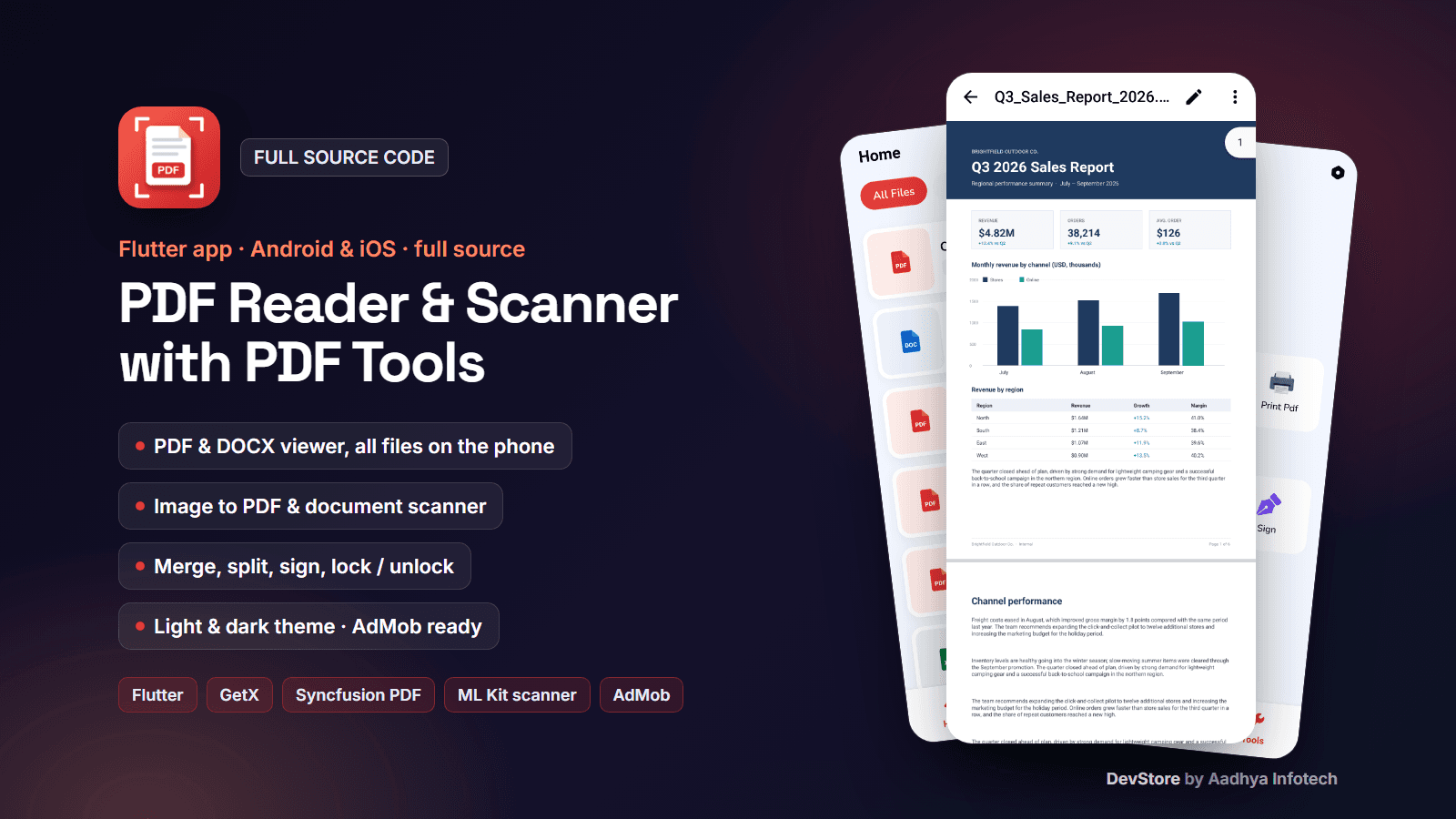
PDF Reader & Scanner is a complete offline PDF reader and PDF toolkit built with Flutter and GetX. It lists every PDF, Word, PowerPoint and Excel file on the phone, opens PDFs in the Syncfusion PDF viewer and Word (.docx) files in an in-app DOCX viewer, and includes the tools users expect: image to PDF, document scanner, merge, split, e-signature, lock / unlock with a password, draw on PDF, PDF to images and print. Light and dark themes, English / Gujarati / Hindi and an AdMob ad system are included. There is no backend and no account: everything runs on the device. Note: the PDF viewer and PDF engine are Syncfusion packages, so you need your own Syncfusion licence (free Community Licence for small businesses, paid otherwise).
Key features
Files & viewers
- Device-wide file list with tabs All / PDF / Word / PPT / Excel, page count, date and size, paging and pull-to-refresh
- Sort by name, date or size; search by name; long-press multi-select delete
- File menu: rename, share, open with, print, merge, sign, set / remove password, save location, details
- PDF viewer with smooth scrolling, zoom, page indicator and password prompt
- DOCX viewer with headings, lists, tables, text search and zoom; DOC, PPT/PPTX and XLS/XLSX open in an installed app
Create & convert
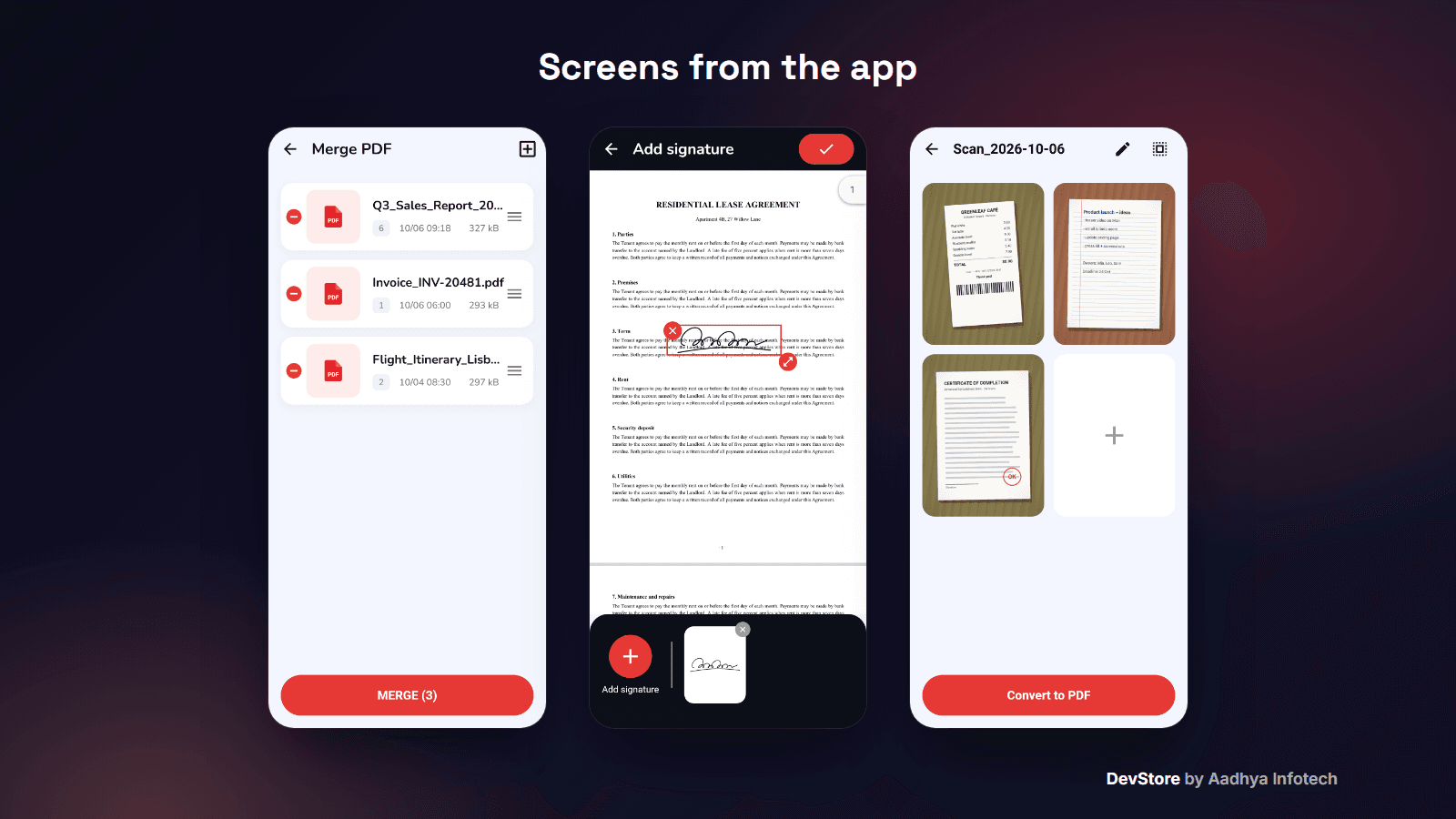
- Image to PDF: in-app gallery grid with multi-select, drag-and-drop reordering, file name and optional password
- Smart Scan with the system document scanner (ML Kit on Android, VisionKit on iOS): edge detection and cropping
- Draw on the new PDF (draw / pan mode, stroke size, undo, redo, reset) before saving
- PDF to Image (every page to PNG at 200 dpi), Import PDF and Print PDF
Edit & manage
- Merge PDF: 2+ files, reorder, page range per file, custom name
- Split PDF: save a start–end page range as a new PDF
- Sign: draw signatures (size, 7 colours), keep a signature list, place, move and resize them on any page, save the signed PDF
- Lock PDF with AES-256 password protection and Unlock PDF
App
- Splash and 3-page onboarding with Lottie animations
- Light / dark theme and a language picker: English and Gujarati complete, Hindi partial
- Settings: rate us, feedback e-mail, share app, privacy policy, app version (all links in one config file)
- Works offline; the internet is only used for ads
What's included
- Full Flutter source code (about 17,000 lines of Dart in 86 files): GetX controllers, screens, PDF services, ad engine
- Android project with native-ad factories and layouts; iOS project with native-ad factories (not built by us)
- Unit tests for lock / unlock, split, merge, the file scan and the translations
- README with a step-by-step guide: rebranding, AdMob, the Google Play All files access declaration, languages, signing, iOS, Syncfusion and other licences, known limitations and troubleshooting
- Original code-drawn app icon with its generator script, key.properties signing template with a debug-key fallback, LICENSE and CHANGELOG; Google test ad IDs only
Tech stack
- Flutter 3.38+ (tested on Flutter 3.47.4), GetX, GetStorage
- Syncfusion syncfusion_flutter_pdfviewer and syncfusion_flutter_pdf (licence required), pdf, printing, docx_file_viewer
- flutter_doc_scanner, image_picker, photo_manager, file_picker, open_filex, share_plus, permission_handler, lottie
- Ads: google_mobile_ads 7
- Android: AGP 8.11, Kotlin 2.2, Gradle 8.14, Java 17; iOS: 16.0
Requirements
- Flutter SDK 3.38 or newer, Android Studio or VS Code, JDK 17
- Your own Syncfusion licence (free Community Licence if you have less than USD 1M revenue and 5 or fewer developers, otherwise commercial)
- An AdMob account for real ads; Xcode 16+ and CocoaPods for iOS builds
- No backend, Firebase project or API keys needed
Setup in minutes
- Run flutter pub get and flutter run on an Android phone: it works with Google test ads
- Change the placeholder package id com.yourcompany.pdfreader, the app name and (optionally) recolour the icon with the included script
- Set your store, privacy-policy and support links in app_config.dart
- Put your AdMob IDs in the manifest, Info.plist and ads_api_service.dart
- Add your keystore to android/key.properties and run flutter build appbundle --release
Monetization (ads/IAP)
- AdMob: App Open (splash and resume), interstitials on navigation with a frequency setting, small native ads on several screens and native ads inside the file list
- Fallback ad unit per format and a master on/off switch in one ads configuration map
- Ads are skipped instantly when the phone is offline
- No in-app purchases
Support & updates
Support is provided through the Aadhya Infotech DevStore: https://www.aadhya-infotech.com/DevStore/contact. Bug-fix updates for this package are published on the DevStore. Please note: you need your own Syncfusion licence; Google Play only allows the All files access permission after a declaration that Google may refuse; DOC, PPT and XLS files open in another app (only DOCX is shown in the app); the iOS project was not built or tested by us. All of this is documented in the README.
Release history
- v1.0.010/6/2026
PDF Reader & Scanner v1.0.0: first source release; Android build fixed for Flutter 3.47, in-app DOCX viewer, offline mode, working Settings links, original icon, placeholder package id. See CHANGELOG.md.